1. What Are Next.js and WordPress?.
If you plan a new business website, you will quickly face a big choice: Next.js vs WordPress. Agencies pitch them on sales calls, developers debate them online, and founders wonder which tool actually drives more sales. This guide cuts through the tech noise with clear facts on speed, search rank, safety, and long-term costs. Making the right choice upfront protects your budget and helps you avoid costly platform rebuilds down the road.
Core Differences at a Glance.
The choice between both options comes down to software structure and business goals. Each tool was designed to solve a distinct set of challenges for website owners. Before diving into the technical details, review these three core facts:
- WordPress is a Ready-Made CMS: It combines an admin dashboard, a database, and design themes into a complete publishing system.
- Next.js is an Engineering Toolkit: It gives developers full control over page speed, custom code, layout design, and data flows.
- Long-Term Site Care: WordPress needs weekly plugin patches and theme updates, while Next.js runs on clean custom code without plugin bloat.
Product vs Toolkit Comparison.
A simple house analogy helps make this choice clear and practical. WordPress gives you a ready-made house where you can paint the walls and swap the furniture. Next.js gives you the raw architectural tools to build a custom home shaped around your exact daily workflow. If your firm needs an original brand style and custom sales funnels, modern custom website design provides an appreciating digital asset that sets you apart from template-based rivals.
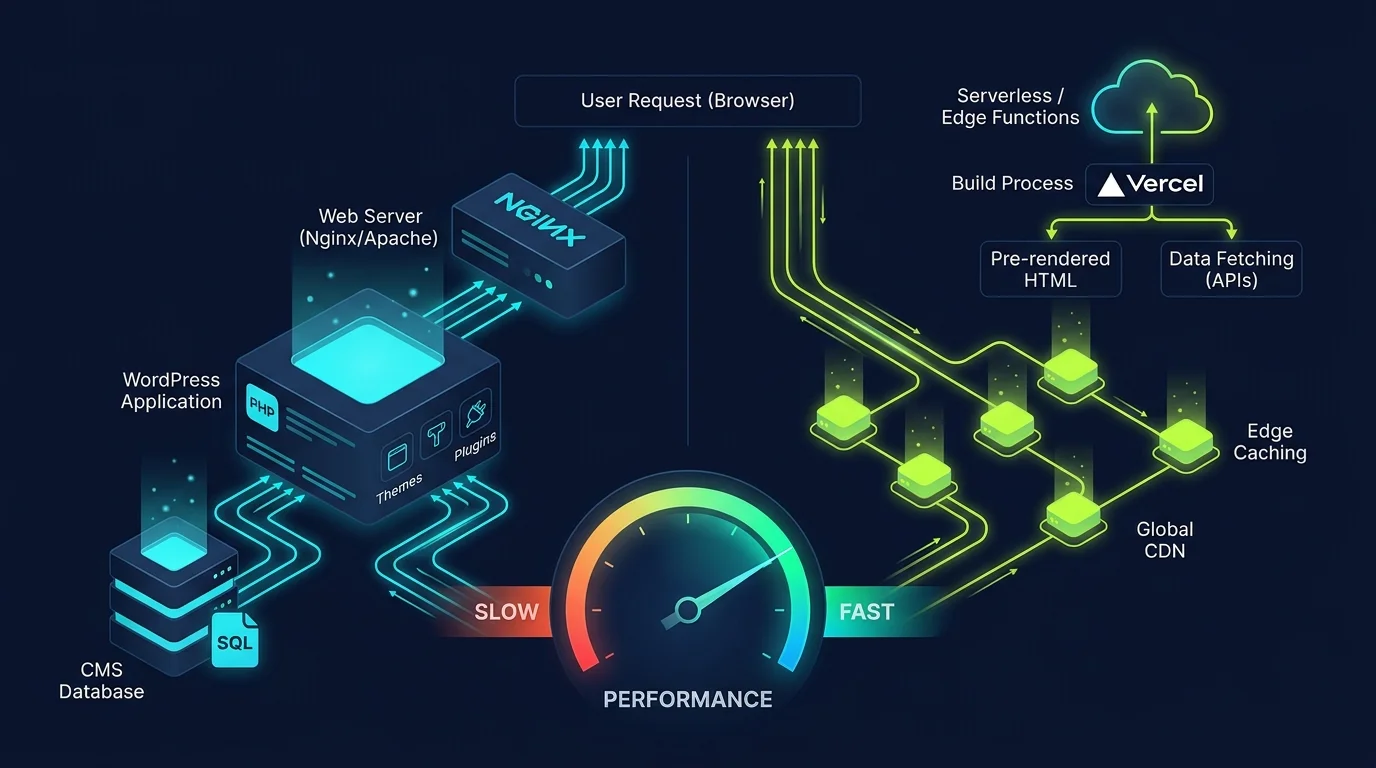
WordPress core runs on PHP and needs a database to build pages when visitors arrive on your site. Non-technical staff can log into the admin dashboard to write blog posts, upload photos, and update staff bios without writing code. However, adding modern commercial features like custom calculators or client portals requires stacking dozens of third-party plugins that can conflict and slow down your site. Over time, that plugin bloat creates technical debt that frustrates users and drains maintenance budgets.
Next.js takes the opposite approach by standardizing speed directly in code. Maintained by Vercel and built on React, it has no bloated default admin panel to weigh down page speed. Developers write clean code that connects to any database, headless content system, or payment tool. It can pre-build static pages ahead of time, render dynamic pages on edge servers, or refresh content in the background on demand. This flexibility gives your team the freedom to build exactly what your market demands.
2. Speed and Google Core Web Vitals.
Website loading speed directly governs customer conversion rates, mobile bounce rates, and Google search rankings. Slow pages lose prospective clients before they ever read your value proposition or view your service offerings. When evaluating Next.js vs WordPress for speed, the two platforms start from fundamentally different baselines. A fast site keeps buyers engaged, improves user trust, and signals high quality to search engine algorithms.
WordPress performance depends heavily on your theme quality, active plugin count, web hosting tier, and caching setup. A bare WordPress theme on premium cloud hosting can load quickly. However, as marketing teams add visual page builders, tracking pixels, font files, and form plugins, every page begins downloading massive CSS and JavaScript files that degrade mobile speed. Keeping a WordPress site fast requires constant audits, paid optimization plugins, and strict server rules.
Next.js includes elite performance tools directly out of the box to deliver superior mobile speed. Its native compiler applies automatic code splitting, meaning each individual page only downloads the exact script chunks it needs. Native font optimization and image components automatically convert images to modern WebP formats and delay loading until pictures scroll into view. These built-in speed features deliver near-perfect mobile Core Web Vitals scores without installing complex caching plugins.
Google evaluates your site using three core metrics: Largest Contentful Paint, Interaction to Next Paint, and Cumulative Layout Shift. Next.js handles all three metrics with ease because HTML files are pre-built on edge servers and sent instantly to visitor screens. WordPress can achieve good scores only when paired with expensive caching servers and aggressive asset minification. For companies where mobile speed drives sales, Next.js provides a dependable speed advantage that never degrades.
Performance Rule of Thumb.
A standard WordPress business website with twenty plugins typically scores between 30 and 55 on Google mobile PageSpeed tests due to render-blocking scripts. A custom Next.js site consistently hits 90 to 100, cutting mobile bounce rates in half and keeping prospective clients on your page.
3. SEO: Search Rankings and Technical Architecture.
Both platforms can rank prominently on search engines, but they approach search engine optimization through different workflows. Search algorithms prioritize content quality, user intent, fast loading speeds, and clean structured data. Understanding how each platform handles these factors ensures your inbound search traffic continues to expand year after year. Good SEO requires technical precision as well as great content.
WordPress offers unmatched convenience for everyday content creators and marketing teams. Popular plugins like Yoast SEO and Rank Math allow non-technical editors to adjust meta titles, edit descriptions, and generate basic XML sitemaps through simple visual form fields. However, these plugins often inject heavy metadata scripts and inline styles into your HTML header, adding unnecessary bloat to every page load. Editors get visual convenience, but developers lose fine-grained control over site markup.
With Next.js, search optimization is engineered directly into the code structure. Developers utilize native Metadata APIs to configure dynamic title tags, canonical URLs, Open Graph social share cards, and rich JSON-LD schema graphs without relying on external plugins. Serving pre-rendered HTML guarantees that search engine bots read your complete text and service links on the very first crawl request without waiting for client scripts to execute.
Pairing your platform build with disciplined technical SEO and Core Web Vitals work ensures that crawl errors, schema graph validation, and internal page hierarchy are properly addressed from the day your site goes live. Pre-rendered pages eliminate the risk of indexation delays on competitive search terms. This technical foundation gives your business an edge in search results that template sites cannot match.
Clean server-rendered HTML also provides superior visibility for modern AI search engines and answer engines. When crawlers like ChatGPT Search and Perplexity parse your content, clean text without script hurdles allows them to cite your brand as an authoritative industry source. Next.js delivers pure semantic markup that AI agents can index in milliseconds, ensuring your business stays visible across the next generation of search platforms.
4. Security and Software Maintenance.
Website security and ongoing software maintenance represent critical factors for modern business owners. A security breach or unexpected malware infection can damage brand reputation, compromise client data, and cause search engines to blacklist your domain with warning screens. Choosing a secure architecture protects your customer relationships and shields your company from costly emergency remediation expenses.
WordPress powers over forty percent of the web, making it the most frequent target for automated hacker bots and credential-stuffing attacks. While WordPress core code is actively maintained, the vast majority of vulnerabilities stem from outdated third-party plugins and neglected theme files. Every additional plugin you install creates an extra doorway that requires weekly monitoring and updates. If a plugin developer abandons their project, your website remains vulnerable to automated exploits.
Next.js platforms offer a drastically reduced attack surface by default. Because marketing pages and service articles are pre-rendered into static HTML and deployed to global edge delivery networks, there is no public database or administrative login portal exposed to the public web. Automated bots have no WordPress wp-admin URL to probe with brute-force passwords, and there is no SQL database running on the public web server to inject with malicious code.
Regardless of which stack you select, technical oversight remains essential for business continuity. Enrolling in a reliable monthly website maintenance plan guarantees that code dependencies stay patched, daily offsite cloud backups are verified, and server performance is monitored around the clock. Proactive care prevents catastrophic downtime and ensures your forms, analytics, and integrations run smoothly month after month.
Having experienced engineers audit your software every month protects your brand against unforeseen disruptions. Regular code reviews catch deprecated packages, verify API keys, and update cloud security policies before any vulnerabilities emerge. This disciplined maintenance approach gives leadership peace of mind knowing that their digital storefront is monitored by dedicated technical professionals.
5. Cost: Upfront Build vs Total Cost of Ownership.
When comparing Next.js vs WordPress costs, business owners must evaluate the total cost of ownership over a three-year period rather than looking solely at the initial launch invoice. An option that appears cheaper upfront can easily become more expensive over time due to hidden licensing fees and frequent emergency repairs. Smart financial planning accounts for hosting, plugins, security, and developer support.
WordPress almost always costs less on day one. A developer can purchase an off-the-shelf theme, install a handful of plugins, and launch a functioning website within a few weeks. However, recurring costs quickly accumulate. Premium visual page builders, form tools, security firewalls, and backup plugins require ongoing annual subscription renewals that often exceed $1,500 to $3,000 every year. Add in emergency developer hours to fix plugin conflicts after core updates, and the real cost escalates rapidly.
A custom Next.js website involves a higher initial design and engineering investment because the user interface and features are custom-coded to your precise specifications. In exchange for this upfront investment, your business avoids expensive annual plugin subscriptions, skips theme renewal taxes, and owns one hundred percent of your custom intellectual property forever. The resulting site is an asset built to last without forced theme migrations or breaking plugin updates.
Hosting economics also diverge over time between the two platforms. WordPress requires dedicated PHP and MySQL database servers, with managed hosting plans often charging $50 to $250 per month as traffic grows. Next.js static pages deploy across global edge networks like Vercel or Cloudflare, where monthly hosting expenses often remain under $20 even during major traffic surges. Over three years, these hosting savings offset a substantial portion of the initial build cost.
Reviewing historical agency data highlights how custom code protects profit margins. Understanding custom web development over website builders reveals why companies that invest in clean bespoke platforms spend significantly less on technical debt over the life of their business. A well-built custom site delivers higher return on investment by minimizing recurring operational expenses.
6. Platform Feature Comparison Table.
The table below provides a direct, side-by-side comparison across the seven core technical and commercial areas that shape business success. Use this breakdown to match your technology stack to your operational goals and resource constraints. Evaluating these trade-offs clearly helps your leadership team make an informed decision:
| Key Evaluation Factor | Traditional WordPress CMS | Custom Next.js Platform |
|---|---|---|
| Default Mobile Page Speed | Moderate to slow (30-65 PageSpeed) | Sub-second (90-100 PageSpeed) |
| Security & Attack Surface | High risk via third-party plugins | Extremely secure (static edge files) |
| Non-Technical Content Editing | Built-in visual dashboard | Requires headless CMS integration |
| Recurring Plugin License Fees | $800 - $3,000+ per year | $0 (features built into core code) |
| Custom Features & Integrations | Limited by theme and plugin rules | Unlimited custom code flexibility |
| Monthly Hosting Overhead | $30 - $250/mo (managed PHP server) | $0 - $40/mo (serverless edge hosting) |
| Best Commercial Application | Content-heavy blogs & basic brochure sites | High-growth lead gen & web applications |
As the table demonstrates, WordPress wins on initial editing convenience, while Next.js excels in speed, long-term security, and technical durability. Selecting the right foundation ensures you spend development dollars on business growth rather than ongoing bug repairs. Each platform brings clear strengths that match different stages of business maturity.
Adopting custom code also eliminates template constraints. Because your engineering team controls every stylesheet and HTML element, your website can evolve dynamically as your business introduces new services and digital tools. Custom architecture gives you the agility to outpace competitors who remain trapped inside inflexible template themes.
7. Real-World Case Example: WordPress to Next.js Migration.
To understand how this architectural transition affects real business results, consider a recent migration conducted for a mid-sized commercial consulting firm. The client originally operated a WordPress site built with a popular visual page builder and thirty-two active plugins. Over four years, the site became sluggish: mobile pages took over five seconds to load, search rankings declined, and annual plugin renewal bills approached two thousand dollars.
Our audit revealed that server response times exceeded two seconds due to bloated database queries and conflicting caching rules. Prospective buyers who clicked Google search ads frequently bounced before landing pages loaded, wasting thousands of dollars in paid search marketing spend. The leadership team recognized that patching an outdated CMS was no longer a viable growth strategy.
We engineered a clean ground-up rebuild using Next.js and the modern App Router architecture. Static Site Generation was deployed across all marketing pages, contact forms were wired to fast serverless endpoints, and media assets were compressed into modern WebP formats. Within six weeks of deploying the new Next.js platform to production, the results were definitive across every commercial metric:
- Google Mobile PageSpeed Score: Jumped from 34 to 99 out of 100, with First Contentful Paint dropping from 3.8s to 0.6s.
- Inbound Consultation Inquiries: Qualified contact form submissions increased by 48% due to frictionless mobile page speed.
- Annual Software Savings: Eliminated $1,850 in annual recurring plugin subscriptions and reduced hosting bills by 70%.
- Zero Security Incidents: Eliminated weekly plugin update chores and removed all automated brute-force login attempts.
This case study proves that platform architecture directly drives commercial outcomes. Moving away from plugin-dependent templates to clean custom code transformed their website into a dependable client acquisition engine. The client achieved faster load times, lower operating costs, and significantly higher consultation volume within weeks of launch.
8. Content Editing and Team Workflow.
Content management workflows represent the area where WordPress remains most competitive. If your marketing team publishes several articles per week, WordPress provides a familiar, mature editing environment. Non-technical staff can format text, embed media, and schedule posts without writing a single line of code. For organizations with high publishing volume and non-technical staff, this built-in convenience is a major operational advantage.
A standalone Next.js website does not include a built-in content dashboard. Content updates require code changes or markdown file edits managed through version control repositories. For engineering teams, managing content in code offers precision and audit history, but for marketing teams, this workflow can create operational bottlenecks that slow down campaign launches.
To give marketing teams the visual editing experience they need, modern companies pair Next.js with a cloud-native headless CMS like Sanity, Contentful, or Strapi. This architecture gives editors a polished visual dashboard while developers maintain total control over frontend code and page rendering. Content creators enjoy a modern writing experience, and the website maintains sub-second page speed and bulletproof security.
9. Headless WordPress vs Next.js Architecture.
Business owners frequently ask about headless WordPress vs Next.js as a potential compromise between editing convenience and modern performance. In a headless setup, WordPress remains the backend content management system, while Next.js powers the public-facing website frontend. Content travels from the WordPress database to the Next.js frontend via REST APIs or GraphQL endpoints using WPGraphQL.
The primary appeal of headless WordPress is preserving a familiar content dashboard for non-technical editors while delivering the speed benefits of a modern React frontend. Marketing teams continue drafting articles in WordPress, while visitors enjoy sub-second page loads served from global edge networks. This approach appeals to established publishers with extensive WordPress content archives that would be costly to migrate.
However, headless architecture introduces notable operational trade-offs that business owners must consider. You must host, secure, and maintain two separate software systems instead of one. Furthermore, standard WordPress plugins that output visual frontend elements like form builders and sliders do not work automatically, requiring custom React engineering for each feature. Content previews also require custom integration code to function properly.
For most growing businesses seeking a modern wordpress alternative for business, pairing Next.js with a modern cloud-native headless CMS delivers a cleaner editing workflow than maintaining a legacy WordPress backend. This streamlined approach minimizes maintenance overhead while maximizing publishing velocity. Companies avoid the security burdens of WordPress while enjoying a flexible, modern content infrastructure.
10. Which Should You Choose for Your Business?.
Choosing between Next.js and WordPress becomes straightforward when you evaluate your project against specific team resources, traffic goals, and feature requirements. Use this practical decision guide to select the right platform for your company. Matching technology to business maturity prevents costly platform migrations down the road:
When to Choose WordPress for Your Site.
WordPress remains a sensible option when launch speed and visual editing convenience outweigh custom software requirements. It serves small teams who need a web presence without hiring software developers. You should build with WordPress if your project matches these scenarios:
- Modest Upfront Budget: You need a straightforward marketing website live quickly with minimal initial design investment.
- Frequent Non-Technical Updates: Your marketing team publishes multiple articles per week and requires a familiar visual editor.
- Standard Plugin Functionality: Your project requirements are satisfied by standard off-the-shelf plugins without custom code.
- Simple Brochure Requirements: Your site functions primarily as a digital business card rather than an interactive software platform.
When to Choose Next.js for Your Build.
Next.js is by far the superior choice when your website serves as a primary revenue generator and performance is non-negotiable. It gives companies a competitive edge in organic search, user engagement, and data security. You should build with Next.js if you require these commercial advantages:
- Sub-Second Mobile Speed: You compete in high-intent search markets where green Core Web Vitals directly impact customer conversion rates.
- Enterprise Data Security: You want a static edge architecture that eliminates public login portals and database vulnerabilities.
- Custom User Portals & Tools: Your platform requires custom calculators, client portals, or integration with custom web applications.
- Zero Recurring Plugin Taxes: You want to eliminate annual plugin license renewals and maintain one hundred percent code ownership.
- Unified Full-Stack Setup: You want your marketing site, blog, and backend API endpoints engineered within one clean codebase.
When selecting a next.js vs wordpress for business website foundation, Next.js represents the smarter long-term technology investment for growth-focused brands. It delivers unmatched mobile speed, bulletproof security, and complete engineering freedom that allows your digital presence to scale effortlessly as your business expands. Your company gains a competitive advantage that compounds over time.
11. Conclusion and Next Steps.
In summary, comparing Next.js vs WordPress reveals that both tools serve distinct business needs. WordPress wins on visual editing convenience and low initial setup costs, making it a reliable solution for straightforward content publishing. Next.js wins on loading speed, security resilience, code ownership, and architectural flexibility for high-growth commercial enterprises. Evaluating these factors objectively guides you to the right investment.
Investing in a custom Next.js platform protects your brand against technological obsolescence and eliminates recurring plugin renewal headaches. Your company gains a blazing-fast digital asset engineered to rank at the top of search results and turn casual visitors into loyal clients. Long-term digital success depends on choosing an infrastructure that accelerates business growth.
Business owners and technical leaders who want to evaluate the ideal architectural setup for their specific goals can consult with our senior development team. We analyze your traffic patterns, integration requirements, and commercial targets to recommend the most profitable technical pathway. You can get a free quote for a custom Next.js website to start planning your high-performance platform today.