When a business has more than a handful of clients, communication tends to spread across email threads, shared drives, chat apps, and spreadsheets. Clients ask for the latest invoice, the status of a project, or a document they sent last month, and someone on your team spends time hunting it down. A dedicated custom web application and client portal solves this by giving each client a secure, single place to find what they need.
Plenty of ready-made products can do this, so the real question is whether you should build a custom portal instead. This guide explains what a B2B client portal is, which features matter, what drives cost, and when investing in custom b2b client portal development delivers a positive return.
What Is a B2B Client Portal?
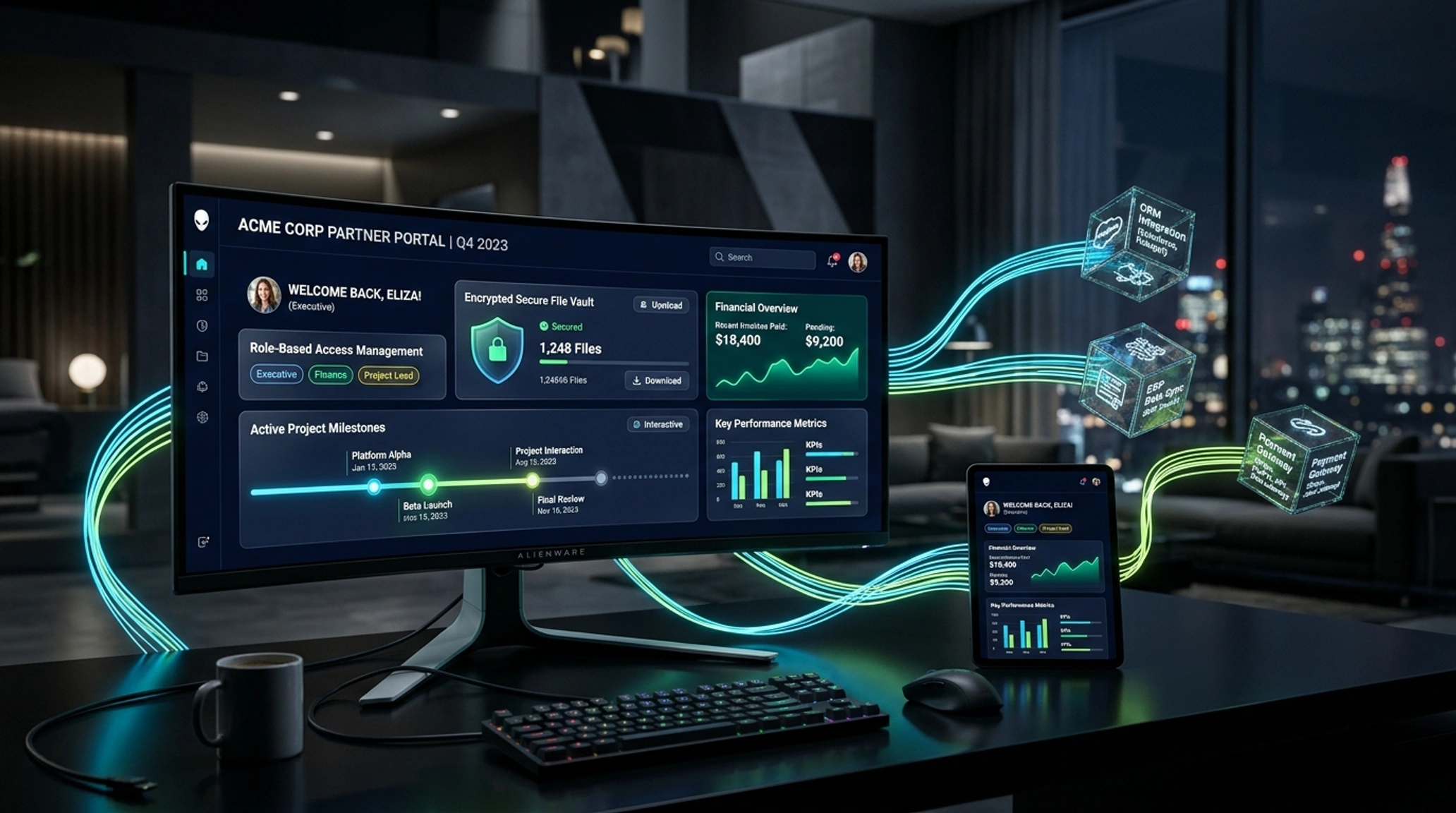
A client portal is a secure, login-protected website where your business customers can access information and perform tasks without contacting your team. Typical activities include viewing projects, downloading files, approving work, paying invoices, submitting requests, and messaging your staff.
B2B portals differ from consumer accounts in a few ways. They usually serve organizations, not individuals, so several people from one client company need access with different permissions. They often connect to internal systems such as accounting, project management, or CRM software. And they carry more sensitive data, such as contracts, financial records, and project files, which raises the bar for security.
Many vendors sell client portal software as a finished product. Commissioning custom b2b client portal development takes the same core idea but tailors architecture, data security, and permissions specifically to your business workflows.
Key B2B Portal Features
Feature needs vary by industry, but most successful portals are built around a small set of core capabilities.
Secure Authentication and Access Control
Login is the foundation. A good portal supports strong passwords, multi-factor authentication, and password recovery that does not weaken security. Larger clients may also ask for single sign-on through standards such as SAML or OpenID Connect, so their staff can use existing company credentials.
Equally important is role-based access control. A client's finance contact should see invoices but not project files, while a project manager sees the reverse. Your own staff need separate roles, such as account managers and administrators.
Client Dashboard
A dashboard gives each user an at-a-glance view of what matters: active projects, pending approvals, recent messages, and outstanding invoices. A clear dashboard cuts down on "where is..." emails more than any other single feature.
Document and File Sharing
Secure file exchange replaces email attachments. Useful capabilities include folder structures per client, version history, upload and download tracking, and permission settings. For regulated or confidential work, file storage must be encrypted and access should be logged.
Messaging and Request Handling
Messages tied to a project or request keep conversations in context and create a searchable record. Support or request forms with status tracking, such as open, in progress, and resolved, let clients see progress without chasing anyone.
Invoicing and Payments
Clients can view invoices, download receipts, and pay online through an integrated payment provider. Handling payments through a certified provider keeps sensitive card data out of your own systems.
Notifications
Email or in-app alerts for new files, approvals, comments, and due dates keep clients engaged without forcing them to log in just to check.
Reporting and Analytics
Some businesses give clients usage reports, performance summaries, or shipment and project data. Internally, admin reporting shows which clients are active, which requests are delayed, and where the process slows down.
Audit Logs and Admin Tools
Administrators need to manage users, reset access, and review activity. An audit log recording who did what and when is valuable for troubleshooting, and often expected in security reviews.
Integrations
The portal becomes far more useful when it connects to the tools you already use, such as accounting software, a CRM, project management tools, or e-signature services. This also reduces manual double entry.
Custom Portal vs Off-the-Shelf Software
When Buying Makes Sense
Ready-made portal products are usually the sensible starting point when:
- Your workflow is standard and the product fits it without much adjustment
- You need something running quickly
- Your client count is small and your budget is limited
- You are comfortable with a recurring per-user or per-client subscription
A good product comes with maintenance, security updates, and support included, and you avoid the risk of a software project.
When Building Makes Sense
Custom development is worth serious consideration when:
- Your processes are unusual and forcing them into a template creates workarounds
- You need deep integration with internal systems that standard products do not support
- Per-user pricing grows painful as the number of clients and users increases
- You want the portal to carry your own branding and feel like part of your service
- Data ownership, hosting location, or security requirements are strict
- The portal is part of your product or a competitive advantage, not just an internal convenience
When evaluating long-term ROI, comparing custom software versus off-the-shelf systems demonstrates that high recurring license tiers often surpass upfront engineering costs over three to five years. Choosing custom b2b client portal development allows complete data ownership, tailored integrations, and zero per-seat licensing penalties.
There is also a middle path. Some businesses begin with an off-the-shelf tool, learn what their clients actually use, and then build a custom portal around those proven needs.
What Affects Client Portal Cost
When estimating custom b2b client portal development, portal projects vary widely, so any fixed figure quoted without scope should be treated with caution. Cost follows the same logic as most software: the work required, multiplied by the cost of the people doing it, plus ongoing running costs. The main drivers are:
- Number and complexity of features: A portal with login, a dashboard, and file sharing is far smaller than one with billing, workflows, and reporting.
- User roles and permissions: Simple roles are quick to build. Granular, organization-level permissions take more design and testing.
- Integrations: Each connected system adds work, and external APIs can behave unpredictably.
- Security and compliance: Requirements such as multi-factor authentication, audit trails, encryption, and customer security reviews add effort. If your clients ask about frameworks like SOC 2 or ISO 27001, discuss this early, since it affects both architecture and process.
- Design and user experience: A portal used by non-technical clients must be easy to understand, which means time spent on research and interface design.
- Data migration: Moving existing client records, files, and history into the new system can be significant work.
- Ongoing costs: Hosting, monitoring, backups, third-party services, and continued development continue after launch.
For comparison, subscription products charge recurring fees that often scale with users or clients. Over several years, compare the total cost of both routes, not only the launch price.
When a Portal Pays for Itself
A portal is a good investment when it removes work or creates value you can point to. Signs that you are ready include:
- Your team spends noticeable time answering status questions, resending documents, or chasing approvals
- Clients complain about not knowing where things stand
- Invoices are paid late because they are hard to find or pay
- Sensitive files are being sent over email
- You are adding clients faster than your manual process can handle
- A polished client experience would help you win or retain larger accounts
Be honest about the opposite case, too. If you have a few clients and a simple relationship, a shared folder and a well-run email routine may be enough for now.
How to Approach the Build
A sensible process reduces risk and cost:
- Define the problem: Identify the specific pain points the portal should solve.
- Talk to clients and staff: Find out what they actually need and which tasks happen most often.
- Start with a focused first version: Launch the features that deliver the most value, such as login, dashboard, files, and messaging, and add more after real feedback.
- Design before developing: Mock up key screens first. Early UI and UX design is much cheaper to change than finished code.
- Plan security from day one: Permissions and data separation are hard to retrofit.
- Test with real users: Invite a few friendly clients to try it before a full rollout.
- Plan for support: Decide who answers client questions and who maintains the system.
If you want to see how these projects are scoped, the team's work on custom web applications and client portals shows the typical approach.
Which Businesses Benefit Most
Portals suit organizations that deliver ongoing work and share information repeatedly with clients. Consultancies, agencies, legal and accounting practices, and other firms in professional services are common examples, because clients need access to documents, deliverables, and billing. Logistics, construction, and education providers also use portals for tracking, bids, and course materials.
Keeping a Portal Healthy After Launch
A portal handles client data, so it is not something to launch and forget. Dependencies need updating, security patches need applying, and new needs will appear as clients use it. A maintenance plan with backups, monitoring, and regular updates is far cheaper than recovering from a breach or outage.
Conclusion
Investing in custom b2b client portal development can reduce repetitive support work, make your service look more professional, and keep sensitive information off email. Whether to buy or build depends on how standard your workflows are, how many users you will have, how much integration you need, and how important control and branding are.
Start with the problem, define a focused first version, and put security and design in at the beginning.
Ready to Build a Secure Client Portal for Your Business?
Streamline client communication, file sharing, and project billing with a custom portal engineered specifically for your corporate workflows.
Plan your client portal with us