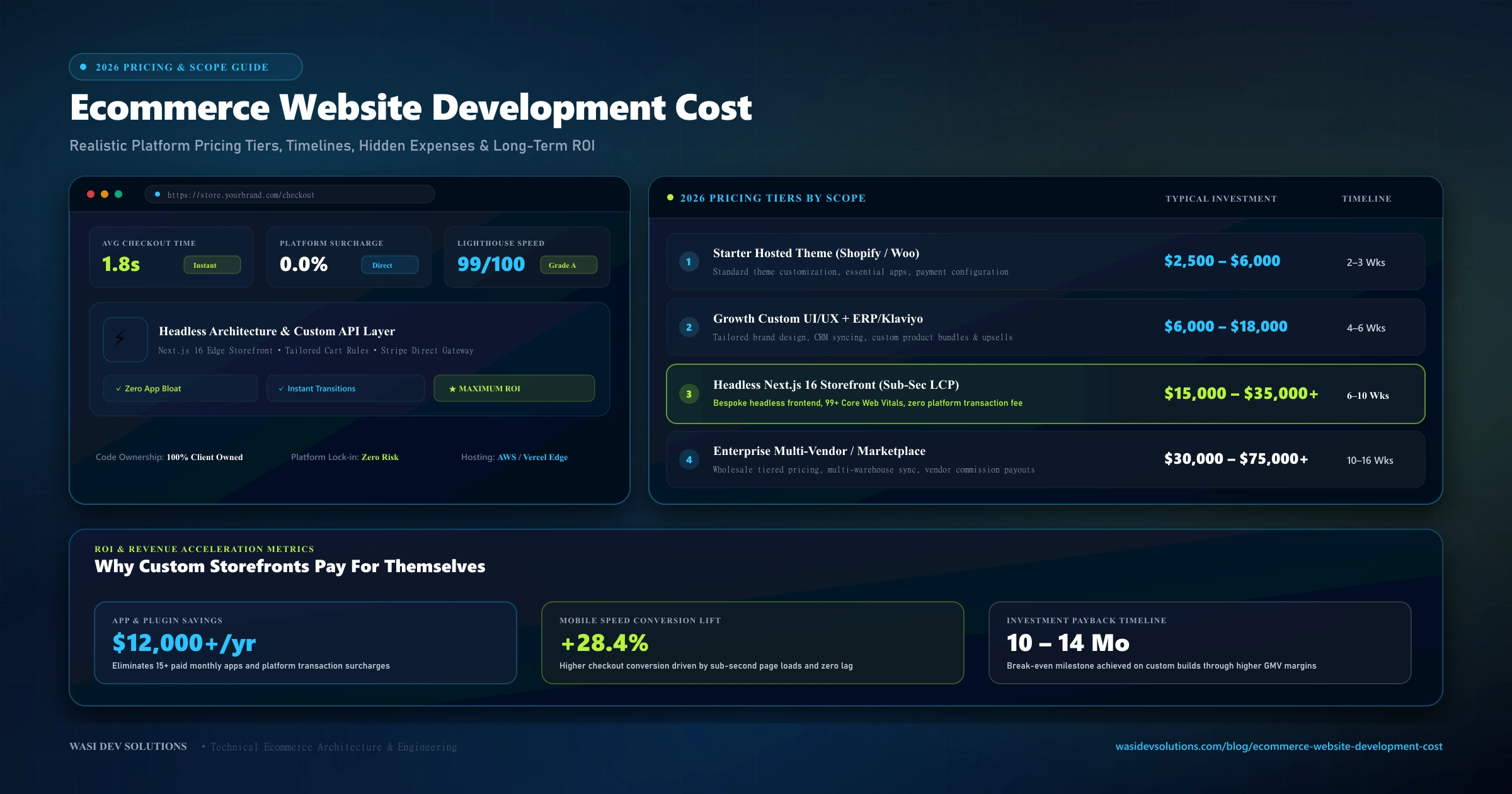
Ask for quotes on an online store and the numbers can differ by a factor of ten. That is not because some agencies are overcharging. It is because requesting professional ecommerce website development can mean a ten-product shop on a hosted platform or a custom marketplace with vendor payouts, inventory syncing, and a mobile app. The price follows the scope.
This guide explains what actually drives ecommerce website development cost, how the main platform choices affect your budget, which costs people forget, and how to save money without damaging your sales. It avoids quoting a single figure, because any number without a defined scope would be misleading.
The Short Answer: It Depends on Scope, Not Page Count
When evaluating realistic ecommerce website development cost, most software pricing comes down to the same logic: the amount of work required, multiplied by the cost of the people doing it, plus the tools and services the store depends on. A store with standard features, a ready-made design, and a handful of products takes far less work than one with custom checkout rules, multiple currencies, and integrations into an ERP.
So instead of asking "what does a store cost?", ask "what does a store with my requirements cost?" The sections below show which requirements move the price the most.
Platform Choice: The Biggest Early Decision
Your platform determines both the upfront build cost and the long-term running costs.
Hosted Platforms (such as Shopify)
Hosted platforms bundle hosting, security, checkout, and an admin panel into a subscription. Launch cost is usually the lowest, because much of the infrastructure already exists and you configure a theme instead of building from scratch. In exchange, you pay recurring fees, may pay platform transaction fees depending on your plan and payment setup, and operate within the platform's limits. Many extra features come from paid apps, and those monthly fees add up.
Open-Source Platforms (such as WooCommerce)
WooCommerce is a plugin that adds store functionality to WordPress. The software itself is free, but you pay for hosting, a theme, premium extensions, security, and the developer time to set it all up and keep it updated. Costs are flexible, and they can grow quickly if you stack many plugins.
Custom-Built Stores
A custom store is designed and coded around your business, often with a framework such as Next.js connected to a database or a commerce API. It costs the most upfront, but you control the experience, avoid recurring licence fees, and can build features that platforms do not offer. For businesses planning full-stack builds, reviewing the Next.js website development cost guide explains how the framework choice affects pricing and long-term hosting economics.
Headless Setups
A headless store keeps a commerce back end, such as Shopify, and replaces the storefront with a custom front end. It sits between the two extremes in flexibility and adds engineering work and maintenance on top of the platform fees.
What Drives the Cost Up or Down
Number and Complexity of Features
Core features such as product pages, a cart, checkout, and customer accounts are common to almost every store. Costs rise with extras:
- Product variants with many options, such as size, color, and material
- Subscriptions or recurring billing
- Bundles, discount rules, and loyalty programs
- Wishlists, reviews, and product recommendations
- Advanced search and filtering
- Multi-language and multi-currency support
- B2B features such as quote requests, tiered pricing, or customer-specific catalogs
Each feature adds design, development, and testing time. A useful exercise is to split your list into "needed at launch" and "can wait".
Design and User Experience
A customized theme costs less than a fully bespoke design. A bespoke interface involves research, wireframes, and visual design before any code is written, but it can improve how well the store converts. For stores where brand and experience drive sales, that investment usually pays back better than extra features.
Catalog Size and Data Migration
Ten products can be added by hand. Ten thousand products, or an existing store with years of orders and customers, need import scripts, cleaning, and testing. Moving from another platform also requires redirects so existing search rankings are not lost.
Integrations
Stores rarely work alone. Common integrations include:
- Payment gateways such as Stripe or PayPal
- Shipping and fulfillment providers
- Accounting software
- Inventory or ERP systems
- Email marketing and CRM tools
- Analytics and advertising platforms
Every integration has its own documentation, limits, and failure cases. Custom integrations with systems that lack a clean API cost the most.
Security and Compliance
Stores handle customer data and payments, so security is not optional. Using established payment providers keeps card data off your own servers, which reduces your compliance burden. If you sell in regulated markets or handle sensitive data, additional work is needed. Budget for secure hosting, SSL, access controls, and regular updates.
Performance and SEO Setup
A store that loads slowly or cannot be crawled loses sales and visibility. Technical work such as image handling, clean URL structure, structured data, and speed tuning is easier and cheaper to build in from the start than to retrofit. Planning technical SEO and performance work during development avoids expensive fixes later.
The Team You Hire
A freelancer, a small agency, and a large consultancy price their time differently, and they also offer different levels of process, support, and risk management. The cheapest quote is not always the lowest total cost if it leads to rework.
Costs That Do Not Show Up in the Quote
Many owners compare only the development price and then get surprised by the running costs. Plan for these:
- Platform or hosting fees: Recurring monthly or yearly fees.
- Payment processing fees: Charged per transaction by your payment provider.
- Apps, plugins, and extensions: Many of which carry ongoing subscriptions.
- Domain, email, and security tools: Annual infrastructure essentials.
- Product photography and content: Critical assets that are often underestimated.
- Marketing: Necessary acquisition budgets because a new store does not bring its own traffic.
- Ongoing maintenance and improvements: Continuous code health and security upkeep.
Maintenance deserves special attention. Software ages, payment methods change, and security fixes arrive constantly. A maintenance plan with updates, backups, and monitoring costs far less than recovering from a breach or a failed checkout during a busy sales period.
Typical Project Types and What They Involve
Without assigning prices, ecommerce projects tend to fall into rough tiers:
- Starter store: A hosted platform with a customized theme, a modest catalog, and standard payment and shipping setup. The work is mostly configuration, content loading, and testing.
- Growth store: A customized design, extra features, several integrations, and SEO groundwork. Typical for businesses that already sell and want better conversion and operations.
- Custom or headless store: A bespoke front end, custom logic, and deeper integrations, built for performance and control.
- Marketplace or complex platform: Multiple vendors, commissions, payouts, dashboards, and extensive back-end logic. This is closer to building software than launching a shop.
Each step up adds work, so it adds cost. The right tier is the one that matches your actual business needs and growth plans, not the most impressive one.
How to Reduce Cost Without Hurting Sales
Cutting cost is easy. Cutting it without damaging revenue takes judgment:
- Launch with a focused feature set: Start with what customers need to buy, and add extras after you see real behavior.
- Use proven services for solved problems: Payments, shipping rates, and email are better handled by established providers than custom code.
- Prepare your content early: Delays in product data, photos, and copy slow projects down and increase cost.
- Decide before building: Changing requirements in the middle of development is a common cause of budget overruns.
- Choose the platform for your next three years: Re-platforming later is expensive, so compare total cost over time, not only the launch price.
- Protect what must not be skimped on: Security, checkout testing, backups, and mobile usability are not areas to economize.
How to Get a Reliable Quote
A good quote starts with a good brief. Before contacting developers, gather:
- A list of products or the approximate catalog size
- The features you need at launch and the ones that can wait
- Your preferred payment methods and shipping regions
- Existing systems that must connect to the store
- Examples of stores whose design or functionality you like
- Your target launch date
Ask each provider what is included, what is billed separately, and what ongoing support looks like. At Wasi Dev Solutions, marketing sites usually launch in two to four weeks, while e-commerce builds typically take four to eight weeks depending on integrations, and proposals state the scope, timeline, and price before work begins. You can see how custom e-commerce stores are scoped, and how projects differ across online retail businesses.
Conclusion
Ecommerce website development cost comes down to scope, platform, and the team you choose, plus the recurring costs that follow launch. The best way to control spending is to define a focused first version, use proven tools where possible, plan for maintenance and marketing, and compare options over several years instead of only on launch day.
Planning an Online Store and Need an Accurate Estimate?
Get a transparent, itemized proposal detailing scope, milestone timelines, platform recommendations, and exact pricing before work begins.
Get a free ecommerce store quote