A customer in Dubai might search for your service in English at work and in Arabic on their phone at home. A site that serves only one of those searches gives away half the opportunity, and a poorly built bilingual site can be worse than a single-language one: mirrored layouts that break, Arabic text in the wrong font, or two language versions that Google treats as duplicates.
Building a bilingual website is more than translating pages. Layout direction, URL structure, search signals and content workflow all need deliberate decisions. This guide covers the technical and commercial side of Arabic-English development in Next.js, from right-to-left (RTL) layouts to hreflang, and explains what affects cost and timeline for businesses investing in Arabic website development Dubai.
High-value sectors across Dubai, particularly agencies operating in real estate and property development, rely on dual-language digital platforms to engage both regional investors and global buyers.
Why Bilingual Matters in the UAE
Arabic is the official language of the UAE, while English is widely used in business, services and everyday life across the emirates. A large share of residents and visitors prefer to read in one language or the other, and many switch between them depending on context.
When planning professional Arabic website development Dubai, companies realize two practical reasons to offer both languages:
- Reach: Customers searching in Arabic won't find an English-only site, and vice versa.
- Trust: A well-made Arabic version signals that you serve the local market seriously, not as an afterthought.
The key word is well-made. A translated copy that looks broken or reads awkwardly can do more harm than good.
Getting RTL Layouts Right
Arabic reads right to left, so the whole interface needs to mirror, not just the text. Navigation order, icon direction, form alignment and spacing all flip. The HTML dir="rtl" attribute on the <html> element, together with lang="ar", establishes the base direction for the page.
Use CSS logical properties
Physical properties such as margin-left or padding-right stay put when direction changes, which is how layouts end up lopsided. Logical properties such as margin-inline-start and padding-inline-end adapt to the writing direction automatically. Modern CSS and utility frameworks support them. For example, Tailwind CSS includes logical utilities and RTL variants, but check your version's documentation before relying on a specific class.
Designing with logical properties from the start is far cheaper than patching a left-to-right layout afterwards.
Decide what should and should not mirror
Not everything flips. Common guidance is to mirror layout flow, navigation and directional icons such as arrows and back buttons, while leaving some elements unchanged:
- Logos and brand marks
- Phone numbers, product codes and other Latin or numeric strings
- Media controls such as play buttons, which many interfaces keep consistent
- Charts and timelines, depending on context
Mixed content, such as an English brand name inside an Arabic sentence, involves bidirectional text rules. Test these cases with real content, because dummy text rarely exposes the problems.
Choose Arabic-ready typography
Arabic script connects letters and needs fonts designed for it. Using an English font stack as a fallback produces mismatched weights and awkward spacing. Families such as Noto Sans Arabic and Cairo are available through Google Fonts, and Next.js can load them with next/font. Test line height, because Arabic often needs more vertical space than Latin text, and confirm that heading and body weights look balanced next to your English type.
Numerals are another decision. Arabic content may use Western Arabic numerals (0-9) or Eastern Arabic numerals, and users have different expectations. Pick one convention, apply it consistently, and check it with native readers.
URL Structure for Two Languages
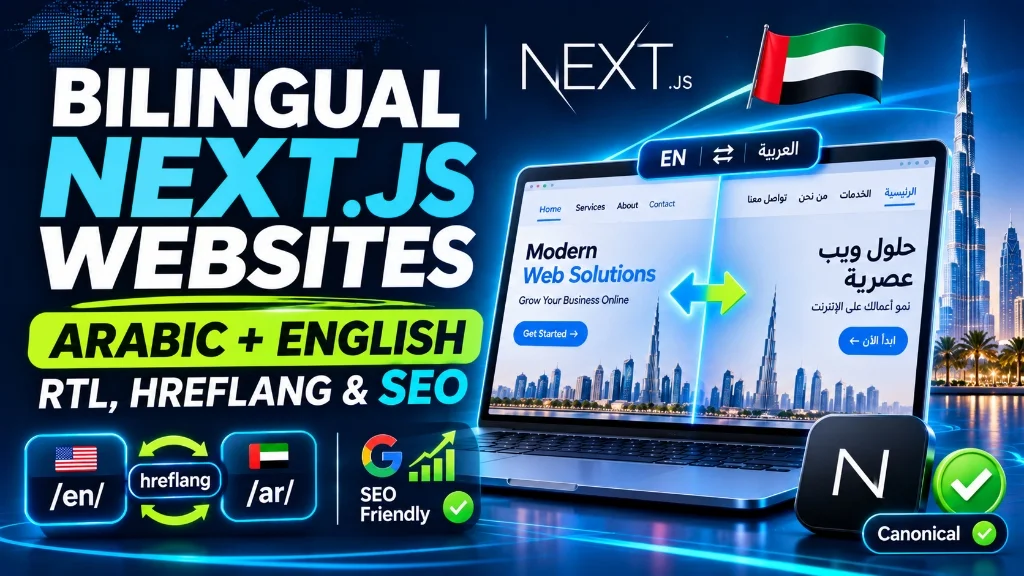
Google recommends giving each language version its own URL, instead of switching language by cookie, session or script on a single address. Separate URLs let search engines crawl and index each version, and let people share a link in the language they are reading.
Three common patterns exist:
- Subfolders: such as
/en/and/ar/, which are usually the simplest to maintain on a single domain. - Subdomains: such as
ar.example.com. - Country-code domains: such as
example.ae, which suit businesses focused only on one country.
For most UAE businesses with a single site, subfolders are a practical choice. Whichever you pick, keep the structure consistent so every page has a clear counterpart in the other language.
Avoid forcing visitors into a language based only on their browser setting or location. Offer a visible language switcher, and let users choose. Automatic redirects can also stop crawlers from reaching one of the versions.
Setting Up hreflang Correctly
The hreflang annotation tells Google that several URLs are language or regional variants of the same page, so it can show the right one to the right searcher. For a bilingual site, each page lists itself and its translation.
A few rules prevent most mistakes:
- Annotations must be reciprocal: If the English page points to the Arabic page, the Arabic page must point back.
- Include a self-reference: Each page lists its own URL among the alternates.
- Use valid codes:
arfor Arabic andenfor English are valid language codes. If you target the UAE specifically, region variants such asar-AEanden-AEare also valid. Don't invent codes. - Add an x-default: for visitors who match none of your languages, typically your language-selector page or your main version.
- Point to canonical URLs: Hreflang should reference the same canonical URL that each page declares.
- Don't mix up canonicals: Each language version should canonicalise to itself. Pointing the Arabic page's canonical at the English page tells Google to ignore the Arabic one.
You can implement hreflang in the HTML head, in HTTP headers, or in the XML sitemap. In Next.js, the Metadata API supports this through the alternates field, including languages, so annotations can be generated per page rather than hand-written. Note that Google relies on visible page content, not the HTML lang attribute, to work out a page's language, so the content itself must be genuinely in the language you declare.
Following a systematic technical SEO checklist for modern websites helps verify these multilingual signals across every template.
Building It in Next.js
The approach depends on which router you use. The Pages Router has built-in internationalised routing configured in next.config.js. The App Router doesn't include that configuration, and its documentation instead describes routing by locale through a dynamic segment, commonly app/[lang]/, with middleware to detect or redirect the preferred locale.
Engineering a robust platform for Arabic website development Dubai requires dynamic server-side rendering so both English and Arabic content variants are immediately indexable:
- Locale routing through a
[lang]segment, withenandaras supported values. - Dictionary files or a translation library holding text for each language, loaded on the server so translated content appears in the initial HTML.
- A root layout that sets
langanddirbased on the active locale. - Per-page metadata: translated titles, descriptions, canonical URLs, Open Graph tags and hreflang alternates.
- A localised sitemap listing both versions of each page.
- A language switcher that links to the equivalent page in the other language, not just the homepage.
Server rendering matters here. When translated text is part of the HTML sent to the browser, search engines can read it without relying on client-side scripts. Applying proven Next.js SEO best practices ensures dynamic metadata and clean rendering across both languages.
Performance deserves attention too. Arabic web fonts can be large, and font loading can affect layout shifts and the largest contentful paint. Managing font display strategies and optimizing Core Web Vitals and LCP in Next.js prevents layout shifts when heavy Arabic font weights load.
Content and Translation Workflow
The technical build is half the job. The other half is the content.
- Use human translators or native-speaking editors, especially for service pages, legal text and calls to action. Machine translation can be a starting point, but it often misses tone and industry terms.
- Localise, don't just translate: Examples, currency formatting (AED), contact options and imagery should suit the audience. Many UAE customers expect WhatsApp as a contact route, so consider making it available.
- Keep both versions in sync: Decide who updates the Arabic version when the English changes, and how you'll catch pages that fall behind.
- Research keywords in both languages: Arabic search terms are not direct translations of English ones, and phrasing varies by audience and dialect.
- Translate metadata too: Titles and descriptions in English on an Arabic page are a common oversight.
Cost and Timeline Factors
Exact prices depend on scope, so be wary of any figure quoted without a brief. For companies budgeting for Arabic website development Dubai, the main factors that influence cost and timeline include:
- Number of pages and templates: since each needs an RTL-checked design.
- Design approach: adapting an existing English design versus designing both languages from scratch.
- Content volume: and who produces the translations.
- Functionality: forms, bookings, payments, search and user accounts all need bilingual handling.
- Integrations: with CRMs, payment providers and messaging tools.
- QA effort: including testing on real devices in both directions.
- Ongoing maintenance: because every future page needs two versions.
Adding bilingual support from the start is generally cheaper than retrofitting it later, because layouts, components and content structures are built with both directions in mind. Reviewing baseline metrics for Next.js website development cost clarifies how bidirectional requirements influence project scopes.
Our specialized website design and development service provides end-to-end engineering tailored for regional brands entering the Gulf market.
Frequently Asked Questions
Do I need separate URLs for the Arabic and English versions?
Yes, this is the recommended approach. Separate URLs let Google index each version and let users share links directly in their preferred language.
Which hreflang codes should I use for the UAE?
ar and en are valid language codes. If you want to target the UAE specifically, ar-AE and en-AE are valid language-region codes. Always add an x-default and ensure all annotations are reciprocal.
Will a bilingual site cause duplicate content problems?
Not when translated pages are properly marked up. Translations are distinct language versions of the same page, and hreflang annotations combined with self-referencing canonicals clarify the relationship for search engines.
Can I use automatic translation for the Arabic version?
Machine translation can assist with preliminary drafts, but unreviewed machine output often reads awkwardly and damages commercial credibility. Always have a native speaker review customer-facing copy.
Conclusion
Investing in professional Arabic website development Dubai with Next.js ensures your brand captures high-intent searches in both languages while delivering a culturally native user experience. A layout built for RTL with logical CSS properties, fonts that suit Arabic script, separate URLs for each language, reciprocal hreflang annotations and genuinely localised content prevent costly rework. Decide the language structure early, build components for both directions, and treat translation as a content discipline rather than a last-minute step.
To plan and deploy a modern bilingual web application for the UAE market, get in touch through our project consultation.